Introduction: Meet my new Framework 13
Finally got the laptop! It has been a dream since I’ve first heard of the company in 2020, thee old T470 Thinkpad has served me well.
With a fresh start I thought I would try to use Fedora on this machine. Ubuntu has been my first flavor of linux, and ever since, the only other distro I have used was SUSE. Running Fedora on my personal machine would be a good way to try something new.
Anyways, the first thing I wanted to do after installing Fedora was to set up hibernation, thus when I performed the installation of the OS, I had created an encrypted swap partition on the SSD. However, guides and resources only showed how to setup hibernation using a swap file or on an older version of Fedora.
Considering that hibernation is now working on this machine for some reason, here is my current configuration to get this working.
Configuration
Secure Boot
Disable Secure Boot via Framework BIOS. Press F12 during startup of the machine to access the BIOS.
Disk Partitioning
During installation of Fedora, I manually configured the disk partitions on my 2TB SSD. I don’t have a screenshot of the configuration but I can share my current lsblk output - below you can identify the encrypted swap partition under nvme0n1p3
$ lsblk
NAME                                          MAJ:MIN RM  SIZE RO TYPE  MOUNTPOINTS
zram0                                         251:0    0    8G  0 disk  [SWAP]
nvme0n1                                       259:0    0  1.8T  0 disk
├─nvme0n1p1                                   259:1    0  954M  0 part  /boot/efi
├─nvme0n1p2                                   259:2    0  2.8G  0 part  /boot
├─nvme0n1p3                                   259:3    0 37.3G  0 part
│ └─luks-0133ae81-ba81-43e8-adba-a397132f61a7 252:1    0 37.2G  0 crypt [SWAP]
└─nvme0n1p4                                   259:4    0  1.8T  0 part
  └─luks-7ccff346-069b-4052-ba5a-f02ea07324c7 252:0    0  1.8T  0 crypt /home
                                                                        /
Ensure the swap partition is mounted in /etc/fstab, and available as swap
On my installation, the swap partition was not mounted and thus wasn’t available as swap. First step was to get the UUID of the swap partition with blkid and have it mounted
# UUID of the swap partition from the output of `blkid`
$ blkid
/dev/mapper/luks-0133ae81-ba81-43e8-adba-a397132f61a7: UUID="c5f2e081-3343-4555-8af2-bf2f99f3dc35" TYPE="swap"

# Using the UUID from blkid, I've added this line to my /etc/fstab
UID=c5f2e081-3343-4555-8af2-bf2f99f3dc35 none swap defaults 0 0
After confirming the mount of the swap partition, I then ensured that the swap is active
$ sudo swapon -a
$ sudo swapon --show

NAME       TYPE       SIZE USED PRIO
/dev/zram0 partition    8G   4K  100
/dev/dm-1  partition 37.2G   0B   -2
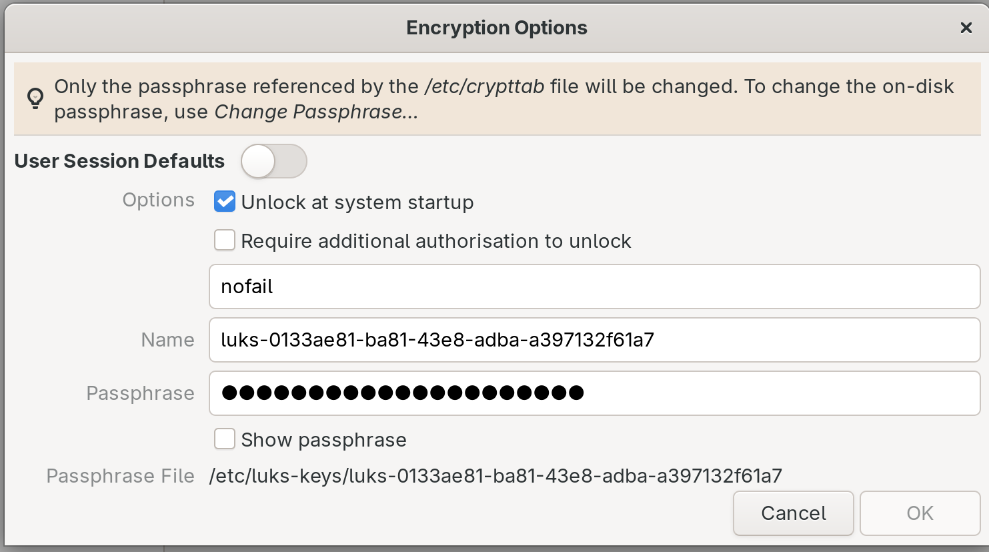
If your swap partition is encrypted ensure the encrypted partition it is in /etc/crypttab
This can be confirmed using cat /etc/crypttab. You can use the Disks GUI to add the encrypted partition. Edit the encrypted partition’s encryption options, enable Unlock at system startup and enter partition’s passphrase.
Dracut configurations dractcut.conf.d
Run the following commands to create the following dracut configuration files. I believe this enables hibernation by allowing the encrypted boot partition to be accessed during the boot process.
$ echo 'install_items+=" /etc/crypttab /etc/fstab "' | sudo tee /etc/dracut.conf.d/50-resume-fix.conf
$ echo 'add_dracutmodules+=" resume "' | sudo tee /etc/dracut.conf.d/resume.conf
$ sudo dracut -f
Grub File changes (or lack thereof)
Initally, I had added the resume=UUID=<swapUUID> parameter to GRUB_CMDLINE_LINUX variable with no success. You don’t need to do this, you can leave the variable as is.
Conclusion
If you are in the same suitation as me, hopefully following these configurations will also have hibernation working on your machine. It’s a great feature to have as it allows you to preserve battery life while still keeping your current session intact.
References
Fedora Magazine - Update on hibernation in Fedora Workstation
Fedora Discussion - [Howto] - Hibernate into swap file
FrameworkComputer - Fedora 41/42 hibernation option (NOT Fedora official)